Hi Folks,
In my last post, we discussed how to create default data packages through the Asset library. LCS is really a good tool to manage your Dynamics project. Today we will discuss one more tool Configuration and Data manager. Demo 1:
In the first demo, we will see how to import a single data package.
Step 1. Login in LCS. Select your project.
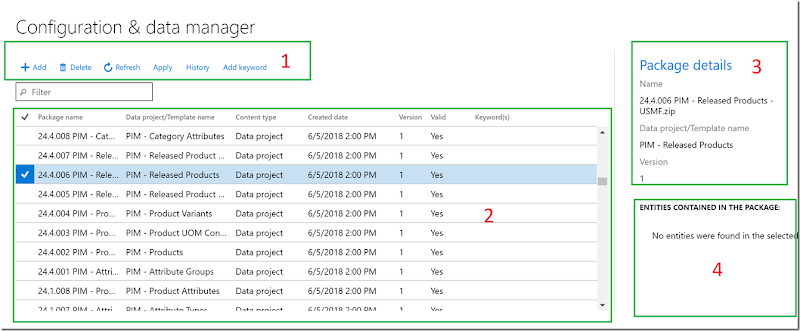
Step 2. Got to configuration and Data management tool. Below is the landing page
here 1. Menu tile, to perform operations
2. Available list of data packages
3. Package details and version
4. List of entities in selected package (its blank here cause of my environment. )
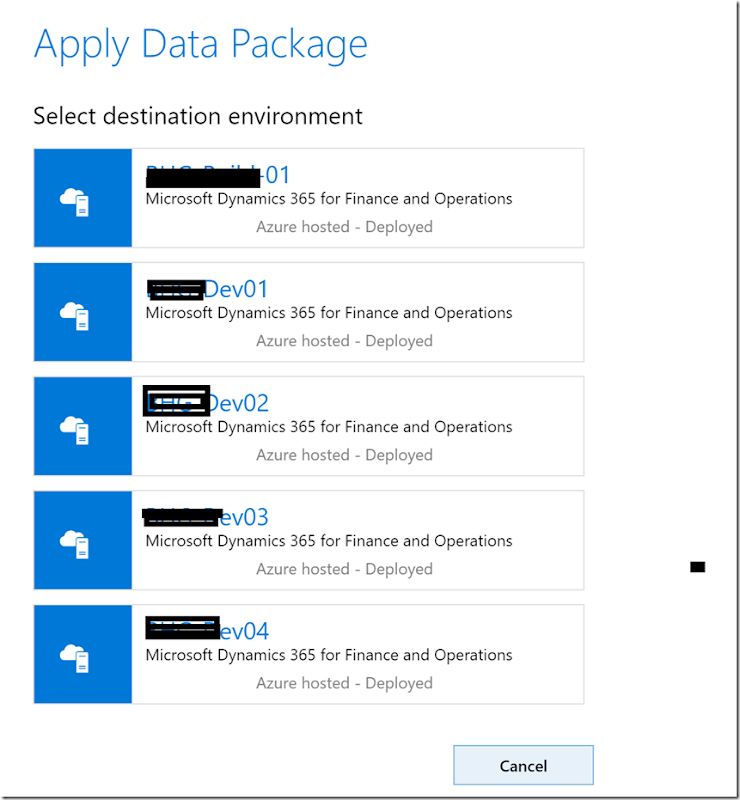
Step 3. Select a package from the grid ( section 2) and click on apply (section 1). The system will ask for destination environment,
Step 4: Once you select a destination environment, now you have to select the company (legal entity) where you want to import this data package.
Select the company and hit the Apply button.
Step 5: Now you go back to your environment and navigate to Data management workspace. You can see a new project created under Data management to import this data package. You can also track the job from the same screen.
Demo 2:
The above demo applicable for single data package import. You can also select multiple data packages and import them in both Concurrently and sequentially. Let's see how…
Step 1: Select multiple data projects (all package must belong logically same module/group)
Step 2: Click on Apply button and select the first option – ‘Apply concurrently’. On next screen give a tag name.
Step 3: Repeat step 3 to 5 from Demo 1.
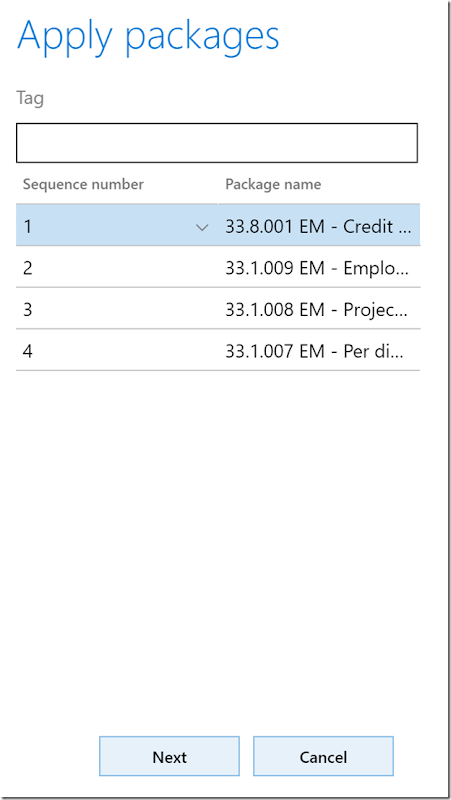
If you select the other option ‘Apply sequentially’, the immediate next screen will ask for a sequence of data packages,
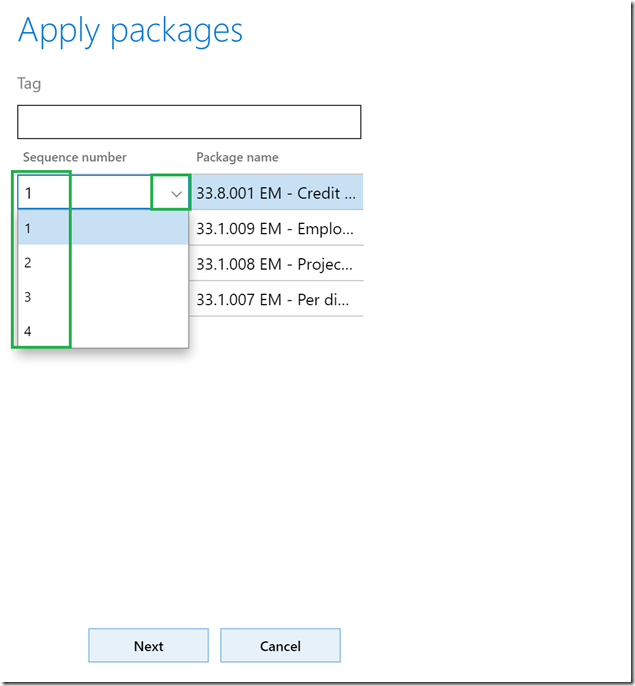
However, the system will give you default sequence based on name and entity contained. You can update the sequence of each package manually as well.
Once you set the sequence, rest steps are the same as the previous import.
I personally found this tool really helpful when a developer really need some test/setup data while development and they can not go back and forth to get dummy data. If the functional team have data in templates/Packages simple you can apply them to any dev/test box.
Try it and share your feedback.
Cheers
Harry…
 Step 4: Once you select a destination environment, now you have to select the company (legal entity) where you want to import this data package.
Select the company and hit the Apply button.
Step 5: Now you go back to your environment and navigate to Data management workspace. You can see a new project created under Data management to import this data package. You can also track the job from the same screen.
Demo 2:
The above demo applicable for single data package import. You can also select multiple data packages and import them in both Concurrently and sequentially. Let's see how…
Step 1: Select multiple data projects (all package must belong logically same module/group)
Step 4: Once you select a destination environment, now you have to select the company (legal entity) where you want to import this data package.
Select the company and hit the Apply button.
Step 5: Now you go back to your environment and navigate to Data management workspace. You can see a new project created under Data management to import this data package. You can also track the job from the same screen.
Demo 2:
The above demo applicable for single data package import. You can also select multiple data packages and import them in both Concurrently and sequentially. Let's see how…
Step 1: Select multiple data projects (all package must belong logically same module/group) Step 2: Click on Apply button and select the first option – ‘Apply concurrently’. On next screen give a tag name.
Step 3: Repeat step 3 to 5 from Demo 1.
If you select the other option ‘Apply sequentially’, the immediate next screen will ask for a sequence of data packages,
Step 2: Click on Apply button and select the first option – ‘Apply concurrently’. On next screen give a tag name.
Step 3: Repeat step 3 to 5 from Demo 1.
If you select the other option ‘Apply sequentially’, the immediate next screen will ask for a sequence of data packages,
 However, the system will give you default sequence based on name and entity contained. You can update the sequence of each package manually as well.
 Once you set the sequence, rest steps are the same as the previous import.
I personally found this tool really helpful when a developer really need some test/setup data while development and they can not go back and forth to get dummy data. If the functional team have data in templates/Packages simple you can apply them to any dev/test box.
Try it and share your feedback.
Cheers
Harry…
Once you set the sequence, rest steps are the same as the previous import.
I personally found this tool really helpful when a developer really need some test/setup data while development and they can not go back and forth to get dummy data. If the functional team have data in templates/Packages simple you can apply them to any dev/test box.
Try it and share your feedback.
Cheers
Harry…