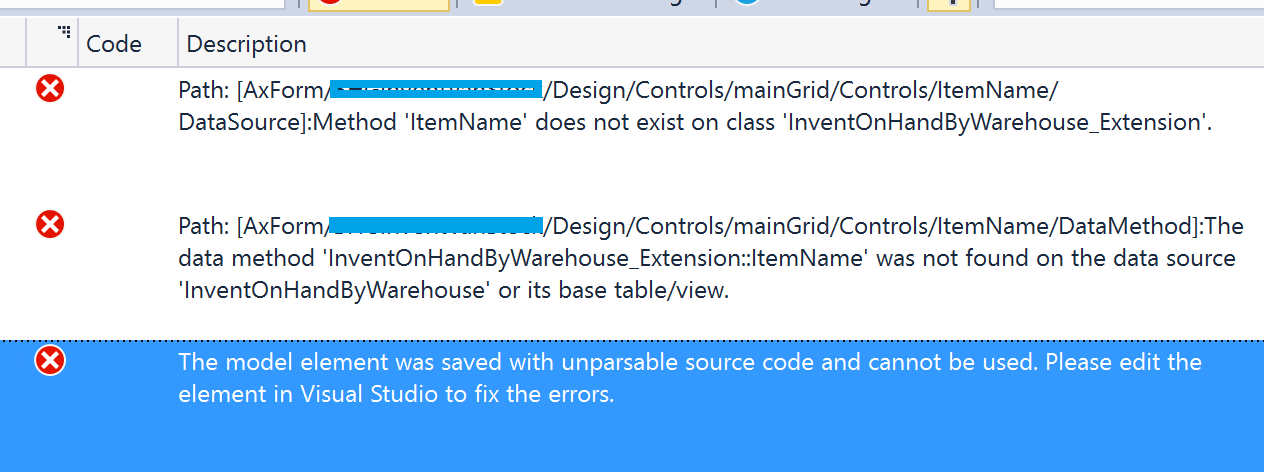
 Possible reason: Sometimes when we rename the object name in code and manually rename the object from Solution explorer, respective metadata still pointing to old names.
Suggested Solution:
This issue doesn't fix even after DB synch and Model build. The only solution I can find for this issue is by deleting the object and create a new one. Yes, delete the object and create a new one with same code and name. This should fix this error.
Let me know if you found some other fix for the same.
Cheers
-Harry
Possible reason: Sometimes when we rename the object name in code and manually rename the object from Solution explorer, respective metadata still pointing to old names.
Suggested Solution:
This issue doesn't fix even after DB synch and Model build. The only solution I can find for this issue is by deleting the object and create a new one. Yes, delete the object and create a new one with same code and name. This should fix this error.
Let me know if you found some other fix for the same.
Cheers
-Harry
Possible reason: Sometimes when we rename the object name in code and manually rename the object from Solution explorer, respective metadata still pointing to old names.
Suggested Solution:
This issue doesn't fix even after DB synch and Model build. The only solution I can find for this issue is by deleting the object and create a new one. Yes, delete the object and create a new one with same code and name. This should fix this error.
Let me know if you found some other fix for the same.
Cheers
-Harry
Possible reason: Sometimes when we rename the object name in code and manually rename the object from Solution explorer, respective metadata still pointing to old names.
Suggested Solution:
This issue doesn't fix even after DB synch and Model build. The only solution I can find for this issue is by deleting the object and create a new one. Yes, delete the object and create a new one with same code and name. This should fix this error.
Let me know if you found some other fix for the same.
Cheers
-Harry